MyFundedFutures Payout Rules: A Trader’s Checklist
By Tanishq Sonawane · 15 October 2026 · 8 min read
Last checked: October 15, 2026 · Sources are linked in the article
Disclosure: QPP is Quant Prop Pilot’s affiliate code with some prop firms, including MyFundedFutures. If you buy with code QPP, we may earn a commission at no extra cost to you. This guide contains no affiliate links.
A green day on a futures prop account can feel like progress toward a withdrawal. But profit on the screen and money you are eligible to request are not necessarily the same thing. The difference comes down to the plan you chose, whether the required buffer has been cleared, the qualifying days in your payout cycle, and any consistency condition attached to that plan.
MyFundedFutures publishes separate payout rules for its Rapid, Builder and Pro plans. Its official overview, dated August 25, 2026, says most payout requests are approved instantly, but also lists plan-specific conditions and notes that manual review can take longer. This guide uses the firm’s own published material checked on October 15, 2026. Treat the figures below as a reading guide, then confirm the terms displayed for your specific account before you submit a request. Source: MyFundedFutures Payout Policy Overview.
1. Start with the payout stage, not the headline
What actually makes a payout request eligible?
A payout policy can require a cleared buffer, a minimum eligible profit, qualifying trading days, a consistency test and completed identity or payment checks. Meeting one condition does not automatically satisfy the others.
MyFundedFutures’ first-payout guide says to confirm eligibility, complete KYC, set up Riseworks and submit through the payout dashboard. It lists different minimums by plan. Read the first-payout guide alongside your plan’s rules.
MyFundedFutures payout rules by plan
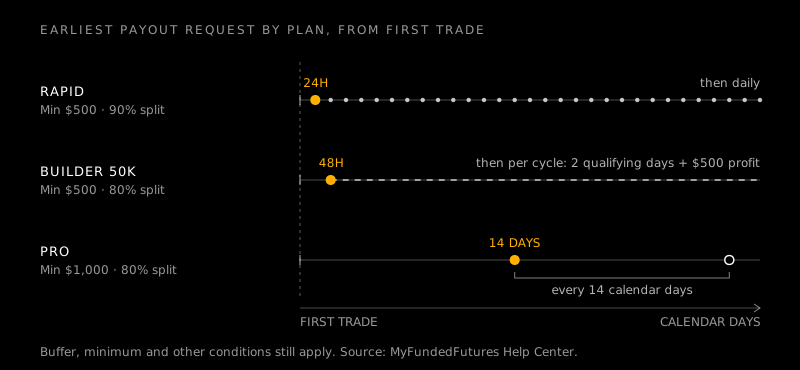
The official overview treats Rapid, Builder and Pro differently: Rapid has daily requests and no consistency rule; Builder includes a consistency condition; Pro uses a longer payout interval. All have plan-specific buffers and minimums. Source: official payout overview.
“Daily” describes the request schedule, not a guarantee of instant approval or delivery. Account size is also different from the buffer, payout cap and net amount received after the profit split.
Why buffer and profit are not the same
A buffer is a threshold in the account rules, not a fee or a withdrawal promise. It can determine when a plan permits a request; eligible profits and caps then determine how much may be requested.
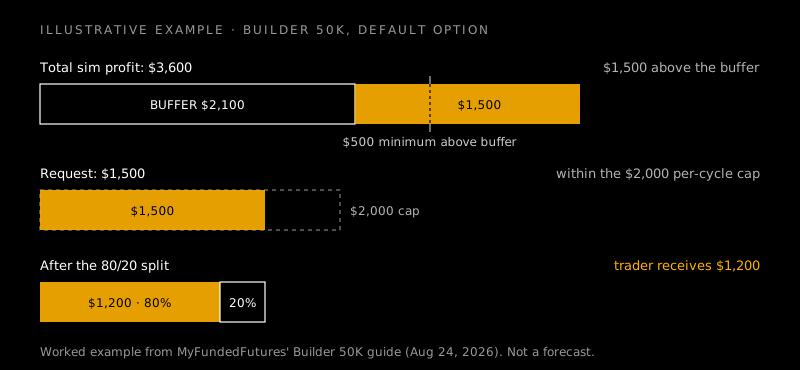
For Builder 50K, the official guide lists a $2,100 buffer for the default option and $1,600 for the add-on. The profit requirement is separate. Check the plan-specific guide and your dashboard rather than relying on memory.
2. Rapid: frequent requests, with a buffer gate
How soon can you request a Rapid payout?
The official overview says the first Rapid payout becomes eligible 24 hours after the first trade, provided buffer and minimum-profit conditions are met. It lists payout frequency as daily. Source: Rapid payout rules.
This is eligibility, not a promise that money will arrive at a particular hour. Confirm the first-trade timestamp, buffer status and minimum request, and separate request eligibility from approval and delivery.
What is the Rapid payout buffer?
MyFundedFutures lists Rapid buffers of $2,100 for 50K, $3,100 for 100K and $4,600 for 150K, with a $500 minimum withdrawal after the buffer is met. These figures are listed under Rapid; check your own plan’s buffer rather than carrying them over to Builder or Pro. Source: official payout overview.
Track account equity, buffer, eligible profit, requested amount and split in separate fields. One “profit” number can hide the difference between performance and the amount allowed for withdrawal.
Are there consistency rules on Rapid?
The official overview states, “No consistency rules” under Rapid payouts. Buffer and minimum-withdrawal rules still apply. It says most requests are approved instantly; if manual review is required, processing may take up to 6 to 12 business hours on weekdays. Source: Rapid payout rules.
The overview lists a 90% trader split for Rapid simulated-funded plans, dated to January 12, 2026. The split does not replace eligibility requirements; confirm the agreement for your account.
3. Builder: qualifying days and consistency matter
What conditions apply to a Builder 50K payout?
The Builder 50K guide says a payout request may be made 48 hours after the first trade if all criteria are met. It lists two qualifying trading days per cycle, $500 net profit above the buffer for the first payout and $500 net profit since the prior approved payout for later requests. Source: Builder 50K guide.
The guide also lists a $500 minimum, a $2,000 maximum per cycle and up to five simulated payouts. Check the matching guide for your actual plan size and version.
How does the 50% consistency rule work?
For Builder 50K, the largest single profit day cannot exceed 50% of total profits in the current payout cycle. The calculation resets after an approved payout, according to the official guide.
Track total cycle profit, the best day, its share, qualifying days and profit since the prior payout. A strong isolated day may not satisfy the rule; calculate it for the current cycle rather than judging from the account balance alone.
What are the Builder buffer and payout caps?
The Builder 50K guide lists buffers of $2,100 for the default option and $1,600 for the add-on, a $2,000 maximum payout per cycle and an 80/20 split. Its example shows a $1,500 request resulting in $1,200 to the trader. This is an illustration, not a promised result. Source: Builder 50K guide.
The overview lists up to $1,000 per request for Builder 25K and $2,000 for Builder 50K. Limits vary by plan, so use the current plan guide and dashboard. Source: payout overview.
4. Pro: longer intervals and a different buffer policy
When can a Pro payout be requested?
MyFundedFutures says Pro payouts can be requested every 14 calendar days from the first trade, subject to the inactivity rule. That schedule differs from Rapid’s daily requests. Source: Pro payout rules.
The overview lists a $1,000 minimum withdrawal, a maximum request of $100,000 per user at the simulated-funded stage and an 80% trader share for Pro. Confirm the latest terms for your account before relying on these figures.
What happens if you’re still in the buffer?
The Pro overview lists buffers of $2,100 for 50K, $3,100 for 100K and $4,600 for 150K. It also says a trader can withdraw up to 60% of profits before fully clearing the buffer. This specific allowance is for Pro, not a rule to assume for every plan. Source: official payout overview.
“Up to” is a limit, not an instruction to withdraw that amount. Check how your dashboard displays the buffer and eligible amount before submitting.
How much of the request will you keep?
The official overview lists an 80% trader share for Builder and Pro, and 90% for Rapid simulated-funded plans. Compare the split with request frequency, buffer, minimum payout, consistency rules and caps; a higher percentage alone does not tell you how soon you qualify. Source: payout overview.
The overview says most requests are approved instantly, while manual review may take 6–12 business hours on weekdays. The first-payout guide gives a 6–12 business-hour processing window excluding holidays. Approval and payment delivery are separate steps. Sources: overview and first-payout guide.
5. From request to receipt: the practical process
What should you check before submitting?
Confirm the plan name and version, buffer, eligible profit, minimum request, qualifying days, consistency calculation, cap and split. Check inactivity and account-status conditions too. Read the overview with the relevant plan guide.
Compare your calculation with the dashboard. If a page, dashboard or older email conflicts, ask support to confirm the applicable rule in writing before submitting.
How do KYC and Riseworks fit in?
The first-payout guide asks traders to complete KYC in the dashboard and set up a Riseworks account. It says US traders can use Plaid/ACH and describes bank transfer or cryptocurrency as withdrawal routes after transfer to Riseworks. Options can depend on location and provider requirements. Source: first-payout guide.
The guide says first-time recipients will receive an email to sign agreements through Riseworks. Check your profile and payment details before requesting funds.
How long does processing take?
The overview says most requests are approved instantly, but manual review can take up to 6–12 business hours on weekdays. The first-payout guide says processing takes 6–12 business hours excluding holidays. Since the wording differs, do not treat either as a guaranteed arrival time. Overview · first-payout guide.
Allow for eligibility checks, review, agreements, provider transfer and final delivery. If a request is delayed, use the dashboard and official support rather than assuming another trader’s experience applies.
6. Avoid preventable payout surprises
Why might a profitable account still be ineligible?
A positive balance does not prove that you have cleared the buffer, met the minimum request, completed qualifying days or passed a consistency rule. Builder 50K, for example, separates the buffer from the additional profit requirement and requires two qualifying days per cycle. Source: Builder 50K guide.
Also account for the profit split. The guide’s example turns a $1,500 request into $1,200 for the trader at an 80/20 split. This is arithmetic, not a payout forecast.
Should you choose a plan only for payout speed?
Payout schedules are only one factor. Rapid offers daily requests but still has buffer and minimum rules; Builder adds consistency conditions and cycle caps; Pro lists a 14-calendar-day interval and its own buffer policy. These are different trade-offs, not a simple ranking. Source: payout overview.
Compare the full rules with your strategy, risk tolerance and cash-flow needs. Do not increase trading risk just to reach a withdrawal threshold faster.
What should you record for every request?
Maintain a dated checklist with the plan name, privately stored account identifier, buffer status, eligible profit, qualifying days, consistency calculation, request amount, expected split and submission reference. Save the policy version and any written support clarification.
Do not show account numbers, identity documents or payment details in public screenshots. Re-check the official rules for every new account or plan change; a summary cannot replace the contract and live dashboard.
FAQ
Does MyFundedFutures offer daily payouts on every plan?
No. The official overview lists daily requests for Rapid, qualifying-cycle conditions for Builder and a 14-calendar-day interval for Pro. Check the rules for your specific plan. Source: payout overview.
Is a payout approved instantly every time?
No guarantee is stated. The firm says most requests are approved instantly, but manual review may take longer; its first-payout guide lists 6–12 business hours excluding holidays. Overview and first-payout guide.
Does the buffer mean I can withdraw that amount?
No. A buffer is a plan-defined threshold, not a promised withdrawal. The plan policy sets the timing, minimum and eligible amount.
Do I need to complete identity verification?
The first-payout guide includes KYC through the dashboard and Riseworks setup. Confirm available payment methods and requirements for your location. Source: first-payout guide.
Where should I confirm the current rule before requesting?
Use the official Help Center guide for your exact plan, then compare it with your dashboard and account agreement. If a rule is unclear or the records conflict, ask support to confirm the applicable condition in writing.
Education only, not financial advice. Trading carries a high risk of loss.